In today’s fast-paced and compliance-driven environment, how you manage access to your claims data is key. For businesses part of the claim supply chain and handling high-volume of claims, robust access control it’s a necessity.
That’s why Claimable implements security-by-design and provides access control features that give you full visibility and control over who can see what.
Here’s how Claimable helps you manage claim access while staying compliant, secure, and efficient:
1. Principle of least privilege
As defined by the NIST, the principle of least privilege ensures that a system restricts user access to the minimum necessary to accomplish their assigned tasks [1]
With Claimable, you can implement the principle of least privilege ensuring that team members only see and access the information they need to do their jobs. Whether it's assigning roles with limited permissions or blocking visibility of certain claims, you're in charge of who can access your claims data.
Our Restricted Claim Types feature lets you specify which users can access certain claim types.
For example, if your team manage employer's liability or worker's comp. claims there may be a need to keep certain sensitive claims only accessible to specific employees.
This not only helps prevent internal errors and data leaks and complying with privacy principles. It also sets you apart from competitors and builds trust with clients and stakeholders who expect high-level of confidentiality and security.
2. Segregate team workloads
Does your company manage multiple teams across departments? Claimable allows you to segregate workloads thanks to the multi-branch feature.
By leveraging our multi-branch feature, you can create teams or departments within your Claimable account and give them responsibility for their own claims.
This allows you to give a team member access to only the claims linked to their department. This keeps things focused, avoids confusion, and ensures sensitive data stays where it belongs.
In addition, for users like managers, regional leads, or head office, that require a wider view, you can grant them access to all claims across all teams. These users can view, submit, and report on claims across all departments, giving them the oversight they need to coordinate and lead effectively.
This structure supports compliance with data protection regulations, while also simplifying internal workflows.
3. Handle sensitive data with confidence
Need to manage confidential or regulated claims like employee incidents or high-profile cases?
Claimable allows you to create specific claim types that are visible only to selected users in your account. In addition, documents and notes can be made private to internal users only allowing suppliers or collaborators to access them.
This ensures that sensitive information is only handled by the appropriate people.
4. One interface, multiple locations
For businesses operating across multiple branches or geographic locations and with around 25% of the average working week now carried out remotely worldwide [2], being able to access your claims platform from anywhere with ease is key!
Claimable is a cloud-based claims management system, accessible everywhere in the world simply from your browser. As the European Commission stresses users “can draw upon almost unlimited computing power and access their data from any internet connection.”
In addition, Claimable allows you to separate access by region or branch, while maintaining a unified view of your operations.
To achieve this, Claimable lets you to create unlimited branches in your account and segregate claims and data by providing access to users to only claims belonging to a specific branch.
For your management teams and those users working in the head office you can set them up with multi-branch access and they will be able to manage, submit and report on claims for all branches.
5. Safer collaboration with external partners
Collaborating with third parties, such as adjusters, inspectors, or suppliers?
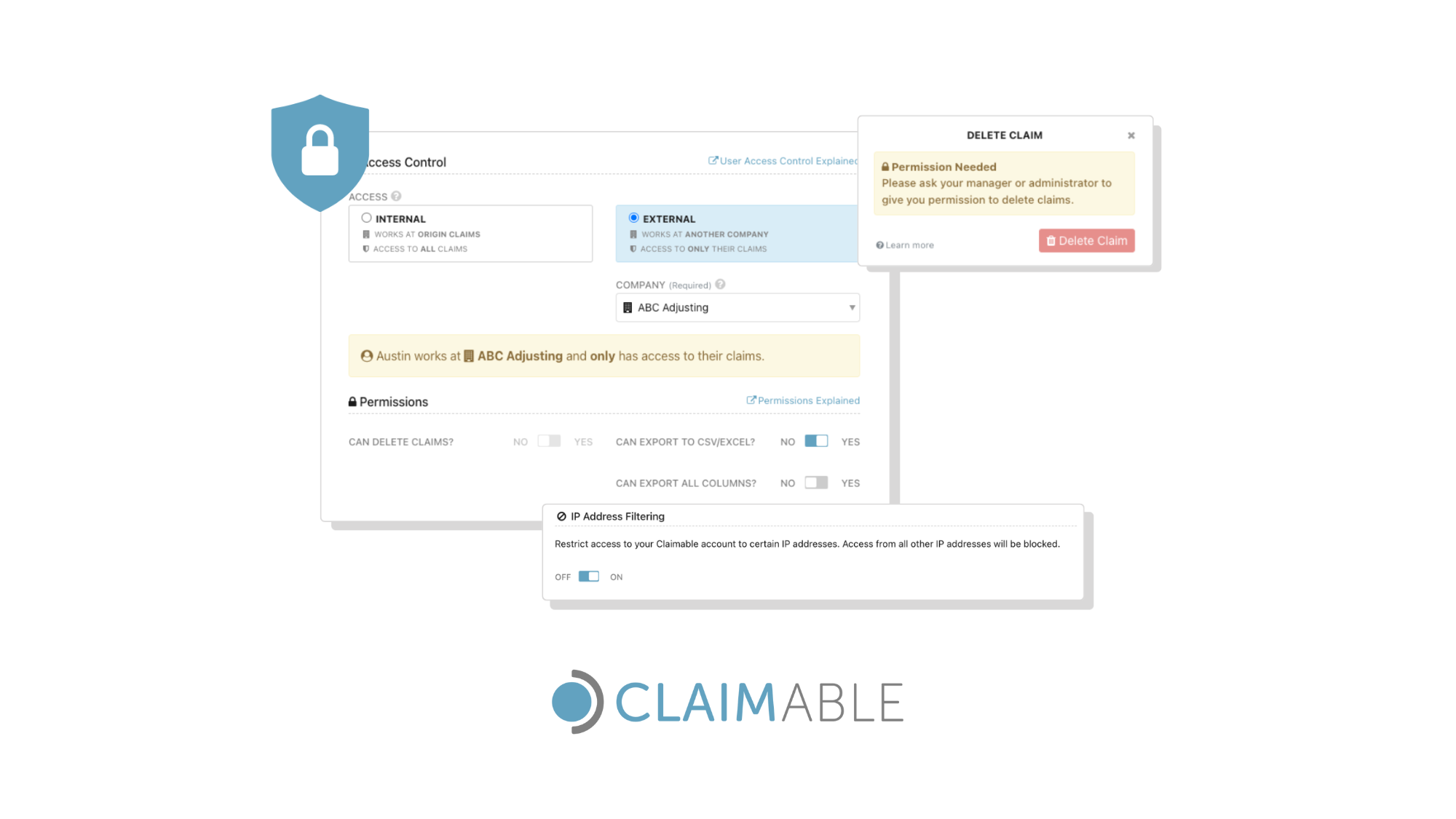
Claimable lets you grant external users limited access enabling them to view and work on only those claims they are assigned to.
Claimable offers restricted access users for free on the Growth or Established price plan. This means you can streamline collaboration, gather supplier input faster, and reduce manual coordination without paying for additional users.
That means better communication, less email back-and-forth, and no risk of sharing the incorrect data.
6. Read-only access
Claimable supports read-only access, ideal for senior stakeholders, auditors, or clients who just need visibility of data without the need to edit information.
Read-only access users are free on our Growth and Established plan: perfect for companies where different teams or stakeholders have to oversee claims.
Our customers benefit from read-only access in many ways, from internal accounts teams running monthly financial reports to sharing information with external auditors for compliance purposes.
Our goal is to improve and streamline the claim process, enabling our customers to streamline collaboration in an affordable and secure way.
7. Visibility levels
Claimable provides visibility controls to manage how sensitive or operational information is shared within your organisation and with external parties.
These controls ensure that external users can only access the appropriate information, maintaining both effective collaboration and confidentiality.
Documents and Notes visibility provides an extra layer of privacy when collaborating with external parties such as suppliers or clients.
8. Per-user permissions
Additional access control can be achieved by specific user-level permission controls that allow you to tailor access based on individual to ensure secure claim handling.
Admins can assign specific permissions to each user, governing what actions they can perform on the platform. For example, you may prevent some users from deleting claims or restrict their ability to export complete datasets.
9. IP filtering
For an even stronger security posture, you can allow only trusted IP addresses to access your Claimable account avoiding and blocking any threat.
You can restrict from which IP addresses users can access your Claimable account by turning on the IP Address Filtering feature. Access from IP addresses not on the whitelist will be blocked.
Claimable claims management software provides simple ways to balance collaboration with control, helping your teams stay productive and secure.
You can try it by yourself with a 14-day free trial, no credit card needed!